 Glyphfield
Shader library
Browse, preview, customize, scrub, and reuse the live GPU material catalog across Design Lab and Animation.
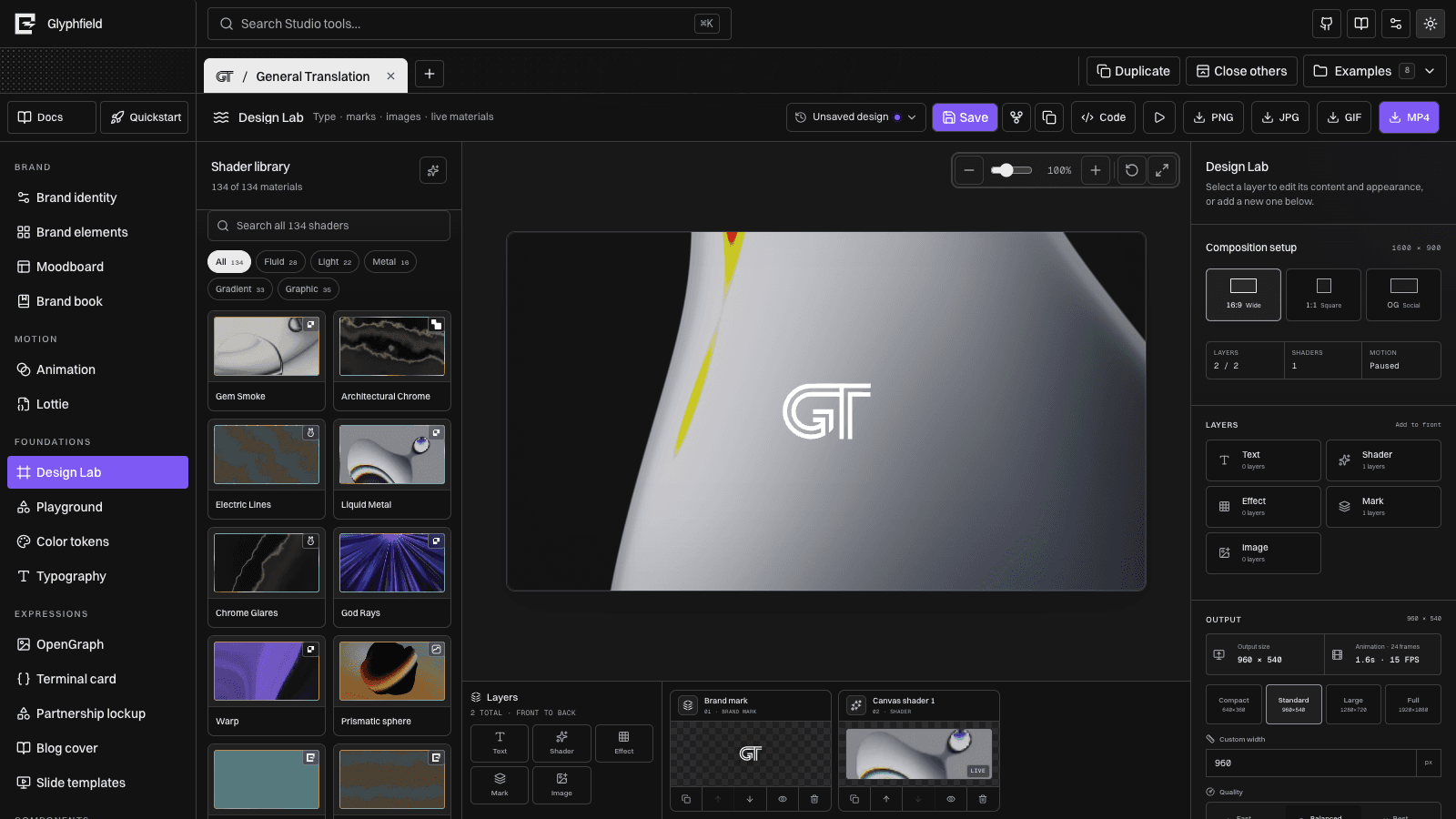
The Shader Library is Glyphfield's shared catalog of live GPU materials. It keeps material discovery separate from editing: choose a moving preview in the library, then refine that shader with the common color, form, light, texture, orientation, and motion controls.
The catalog combines licensed upstream adapters and original Glyphfield studies. Results are curated by visual quality rather than grouped by provider, so the strongest starting points appear first in All. Gem Smoke and Architectural Chrome lead the default order; Prismatic Sphere appears before Glyph Field; utility and novelty looks are available without crowding the best starting points. Read /api/materials for the current count and exact IDs.
Defaults by surface
New Design Lab compositions start with Gem Smoke (paper-gem-smoke), replacing the legacy Holo Cloth default. Existing drafts are migrated only when they still contain that untouched legacy default; an authored Holo Cloth choice is preserved.
Animation and marketing hero surfaces use their own intentional defaults. Read defaults from /api/materials for the current mapping instead of assuming every host starts on the same material. A saved composition always uses its serialized material ID and frame state rather than a new-project default.
Where it appears
| Workspace | Library behavior | Selection result |
|---|---|---|
| Design Lab | Opens as the left library beside the composition | Adds or replaces the selected shader layer while keeping content layers independent |
| Animation | Appears below sources and the two-column animation-package gallery | Updates the shared sequence background by default, with explicit per-frame overrides |
Design Lab's library, canvas, inspector, and layer dock each scroll independently with Glyphfield's minimal scrollbar. Narrow layouts collapse secondary controls without losing the selected material.
Browse and select
Every card contains a live preview, material name, source badge, and selected state. Search matches the name, description, and engine. Source filters include:
- Design studies
- Paper
- Glyphfield
- Shaders.com
- WebGL Fluid
- ShaderGradient
Choosing a source filter narrows the current quality-sorted catalog; it does not change how the shader is rendered or edited.
Every material has an authentic representative thumbnail. Live previews render only while close to the visible gallery, use a reduced render scale, and run at a capped frame rate. Animation-package previews use one shared preview clock and also stop when they leave the panel. These constraints keep the complete catalog visible without making the main canvas compete for the full GPU budget. Hidden pages pause live canvases, and reduced-motion mode holds animation-package cards on a representative frame.
WebGL availability
Studio probes WebGL 2 before mounting Three.js, Paper, or ShaderGradient providers. If the browser is sandboxed, GPU access is disabled, or context creation fails, the provider is never constructed and the canvas displays a representative three-color static fallback instead. A provider error boundary also catches context-loss races. Studio controls, source editing, deterministic background recipes, and non-WebGL exports remain usable without a runtime overlay.
Shared controls
After choosing a material, use the adjacent inspector to edit it. Paper presets, Glyphfield materials, design studies, ShaderGradient, Shaders.com studies, and Fluid Energy all resolve through the same high-level controls:
- Color system: the active brand palette, reusable three-color palettes, and individual HEX or OKLCH colors
- Form: strength, detail, frequency, amplitude, and density
- Light and texture: brightness and grain
- Orientation: X, Y, and Z rotation
- Motion: playback speed
- Scale: logarithmic shader zoom from
0.1×to10× - Frame: a deterministic material-time slider that can pause on an exact look
The palette menu includes the active identity plus curated signal, mineral, paper, dither, monochrome, mercury, ultraviolet, copper, arctic, vermilion, and cobalt starting points. Each palette applies a coordinated group of three colors without locking later edits.
Not every underlying shader interprets a control identically. The common settings are mapped into the vocabulary of each renderer so switching materials remains predictable while each family keeps its own character.
Shader time, pause state, size, colors, and every common setting are part of the host document. Saved Design Lab compositions therefore reopen on the authored material frame instead of restarting from an unrelated wall-clock time.
Converted source assets
The shared conversion library accepts SVG, PNG, JPEG, WebP, GIF, AVIF, and BMP files. Glyphfield sanitizes SVG input, rasterizes a transparent working copy at 1024, 2048, or 4096 pixels, and stores both the original and shader-safe PNG locally in IndexedDB. Nothing is uploaded.
Background and logo layers select source assets independently. Image-aware Paper shaders use the converted PNG as their native texture; other shaders blend it into the selected layer with an editable strength. Applying a shader to both layers also copies its source asset and strength, while later edits remain independent.
The original file and converted PNG can both be downloaded from the library. PNG and GIF exports composite the same converted assets shown on the live canvas.
Catalog sources
The shared catalog combines several implementation types:
- Original Glyphfield mesh, grain, dither, glyph-volume, and GLSL materials
- The editable ShaderGradient sphere
- Nine original studies of public Shaders.com visual techniques, including Spectral Bloom, Architectural Chrome, Soft Register, and Circuit
- Fluid Energy, adapted from Pavel Dobryakov's MIT-licensed WebGL Fluid Simulation
- 29 Paper shader families and 120 upstream-authored presets rendered with
@paper-design/shaders-react - Original design studies informed by Evil Rabbit Shaders, GRADIENTOOL, and Grainient
Source badges identify the family directly on each preview. When a selected material has an upstream project or visual reference, the inspector exposes that link. The referenced Evil Rabbit, GRADIENTOOL, and Grainient studies are original implementations; their source code and downloadable assets are not bundled.
Dedalus Bloom is not part of the catalog. Existing saved IDs are normalized to a supported material instead of leaving the canvas in a broken state.
See the repository's Third-party notices for license and attribution details.
Animation backgrounds
Animation uses one sequence background by default. Choosing a library card or changing its colors, form, grain, motion, or finish updates every frame that follows the sequence background. Select This frame only before editing when one state needs an intentional variation; Use sequence background removes that override, and Make all frames follow sequence clears every override at once.
The main animation canvas renders only the shader layers needed by the current transition. Preview and GIF export use the same frame configuration, so material changes are not flattened before capture.
The animation canvas also supports direct size editing: drag the right edge to change width, the bottom edge to change height, or the corner handle to change both. The live dimension readout and inspector values update the same persisted canvas settings.
Output and portability
Design Lab exports PNG, JPG, GIF, MP4, and shader-sequence GIF/MP4. Animation composites selected shader backgrounds into GIF or MP4 and keeps material time synchronized with its playhead. Live WebGL output uses the browser renderer and is programmatically available through window.glyphfield.studio; deterministic background generation remains available through POST /api/generate.
Design Lab's portable source preserves the material ID and settings inside shader elements and metadata, including layer opacity/blend, source assets, frame history, transforms, and sequence timing. Animation stores its shared material in sequenceBackground and lists intentional frame exceptions in backgroundOverrides. Use the source returned by the current tool as the authoritative schema for round trips.
See Design Lab, Animation, and Source format reference for workspace-specific details.