 Glyphfield
Templates and expression tools
Create OpenGraph graphics, terminal cards, partnerships, blog covers, and complete slide systems.
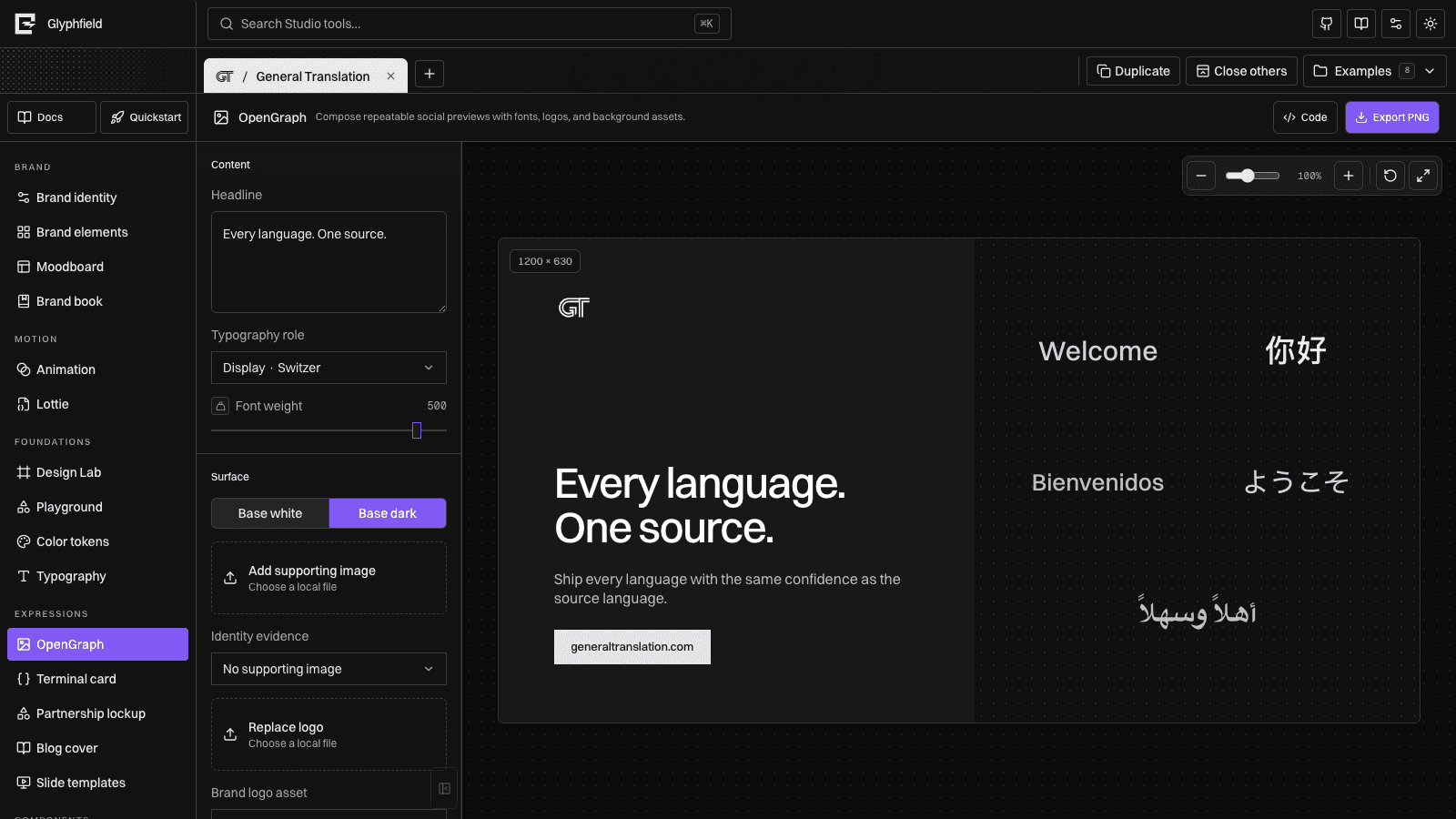
OpenGraph
OpenGraph produces a 1200 × 630 social preview with an editable headline. Switch between light and dark identity surfaces, replace the logo, load a font, or add a background image.
Uploaded background and logo assets support opacity, position, and scale controls. Download produces a PNG with the current composition.
Terminal card
Terminal card renders TypeScript, Python, or Bash using Prism token colors. Edit the title and source, then download a 1200 × 630 PNG.
Partnership lockup
Partnership lockup optically balances the active identity with a selected proof-asset partner or an uploaded logo. Control both logos independently and switch surface textures.
Blog cover
Blog cover combines identity typography, editorial copy, textures, and an optional positioned background image at 1200 × 630.
Slide templates
Slides use a 1600 × 900 canvas and 14 reusable layouts:
- Title
- Section
- Agenda
- Split
- Metrics
- Quote
- Timeline
- Statement
- Comparison
- Process
- Chart
- Team
- Image
- Closing
Title, body/list, background image, texture, and logo placement are shared across layouts. Newline-separated body content feeds agenda, split, timeline, quote attribution, and supporting copy.
Layer editing
Templates expose independent Brand, Content, and Footer layers. Nothing is selected on load. Select a layer from the canvas or inspector to reveal its state, then:
- Drag it anywhere on the artboard.
- Resize from the corner handle.
- Nudge by one pixel with arrow keys or ten with Shift + arrow.
- Move it forward or backward in the stack.
- Align it to any canvas edge or center axis.
- Reset that layer without changing the remaining composition.
Layer transforms and stacking order are persisted per project and template tool. The same transforms are passed into the SVG/PNG export so the downloaded artifact matches the canvas.
The API can generate the same slide layouts as standalone SVG. Browser downloads rasterize the selected layout to PNG.
Source editing
Every expression tool exposes Code in the right-side drawer. OpenGraph, Terminal card, Partnership lockup, Blog cover, and Slide templates each serialize the configuration that drives their visual controls and renderer. You can edit copy, layout choices, surface settings, asset references, and layer transforms in source, apply the result, then continue arranging it on the canvas.
The drawer validates the tool's own document shape before applying it. It does not turn an artifact into arbitrary HTML, and it does not bypass asset or font rules. See Source code editing and Source format reference.
Color, typography, and tactile backgrounds
Build identity foundations and deterministic tactile surfaces, then use them inside Design Lab and every expression tool.
Editor systems and plugins
Reuse the stateful color, canvas, source, layer, select, material, and persistence primitives that keep Studio tools consistent.